Skip to content
ProstoGet the APK

Android Free, open-source browser

Too many tabs?Good.

Prosto keeps every tab on a dock under your thumb, sorts them into workspaces and folders, and loads pages before you notice. A calmer way to browse on your phone.

Why another browser

Tabs aren’t a screen. They’re a dock.

Moving the address bar down made browsers easier to reach, but your tabs are still hidden behind a counter button and a full-screen grid, and every switch is a detour away from the page. In Prosto the open tabs sit right on the dock. Tap one, or swipe, and you are already there.

Typical browser 3 steps

Page
Tab grid
Page

Prosto 1 tap

Page
Same page, other tab

What makes it different

Built around one idea: working in the browser should feel effortless.

The dock

Every tab, one tap away.

Open tabs live on a floating dock at the bottom of the screen. Switch with a tap or a swipe, drag to reorder with spring physics, and never dig through a grid again.

  • Tabs always in sight, not behind a counter
  • Hides while you scroll down, returns on a light flick up

Workspaces

Three browsers in one.

Keep Work, Study and Personal fully apart. Each workspace has its own tabs, favorites, history and recently closed pages, with isolated cookies and logins.

  • Pick a color and the whole interface is tinted to match
  • Swipe up on the dock to choose, like Android Recents
  • Sign in to two accounts on the same site, side by side

Folders

32 tabs. Zero chaos.

Group related tabs into folders, in the dock and in the tab grid. A folder opens right where it sits, so you never lose your place to a modal dialog.

  • Folders live on the dock and in the tab grid
  • Opens in place, never in a pop-up dialog
  • Prosto suggests a folder when several tabs share a site

Instant by design

Pages open before you notice. Tab switches never flash white.

Most browsers show a blank screen between the tap and the paint. Prosto keeps the last frame on screen until the next page is ready, so moving between tabs feels like flipping a page, not reloading one.

Typical browser

Blank screen while the page loads

Prosto

The previous page stays until the new one paints

Privacy

Protected by default. Quiet by design.

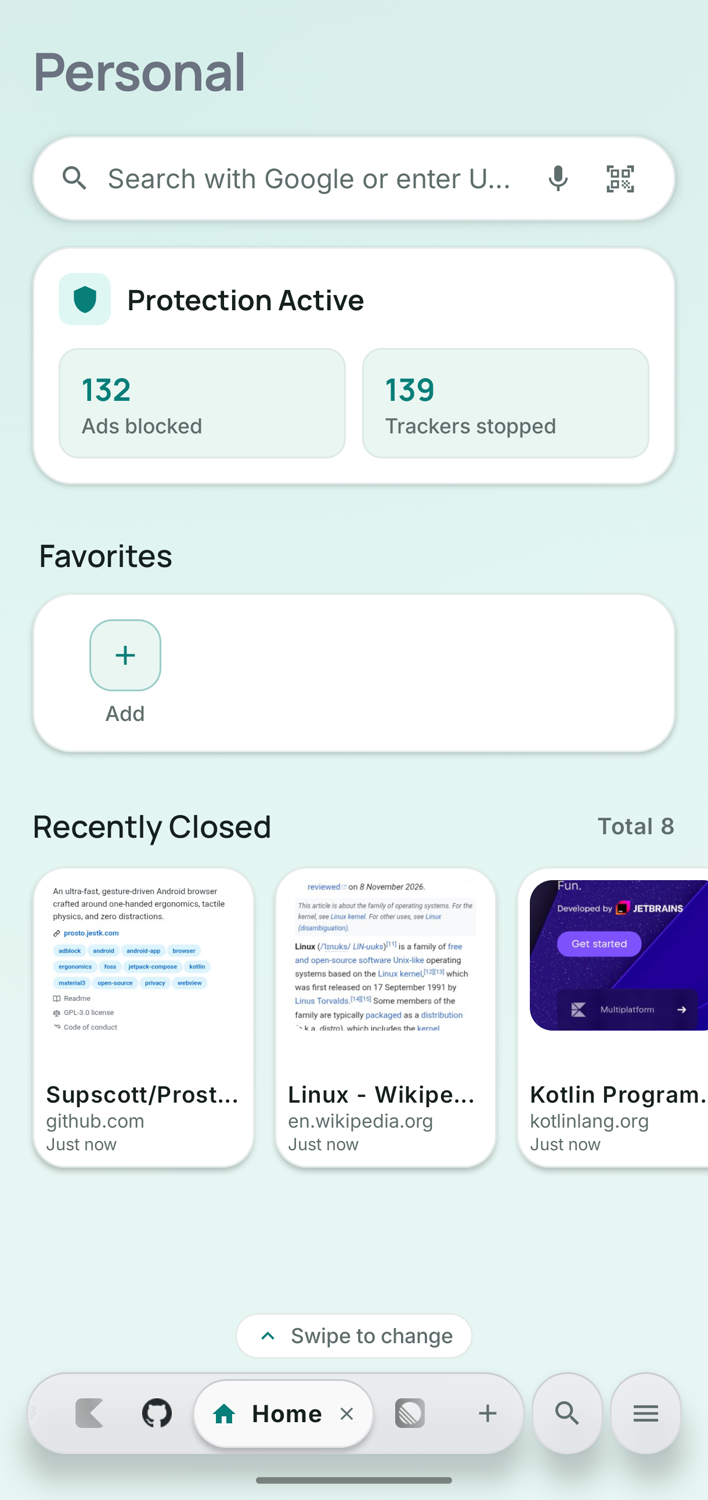
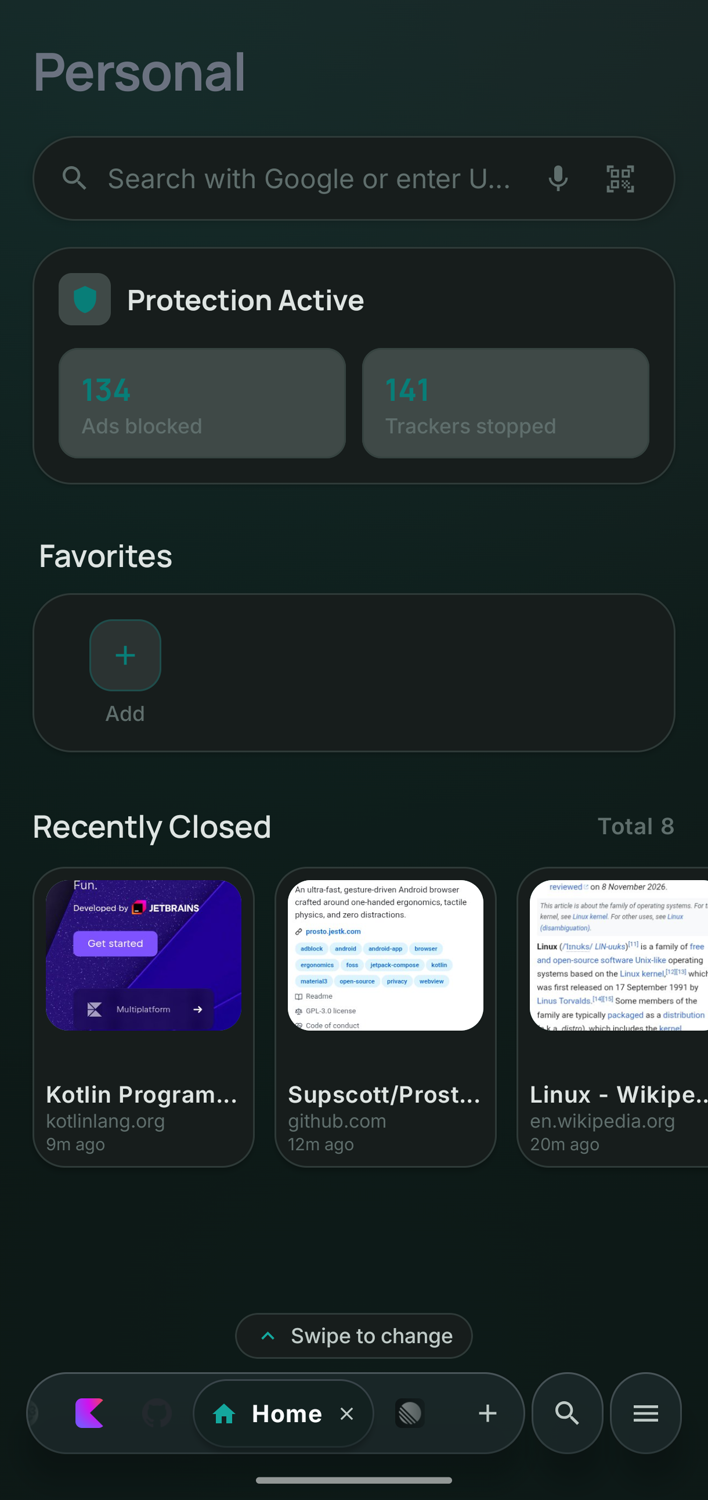
Ads and trackers are filtered before they load, and hidden ad containers are removed without shifting the page. Your Home screen keeps a live count of everything that never reached you.

132Ads blocked
139Trackers stopped

Counters shown as on the Home screen after a short browsing session.

  • Zero telemetryThe app has no analytics, no tracking and no account to create.
  • Open sourceGPL-3.0. Read, audit and build every line yourself.
  • Incognito tabsSeparate cookies, no history, no screenshots, wiped on close.
  • Isolated spacesEach workspace keeps its own cookies and logins.
  • Open filter listsBlocking is built from public lists into a compact domain index.
Prosto Home screen in light themeProsto Home screen in dark theme

The details

Small things, done properly.

  1. 01

    Incognito tabs

    Long-press “+” for a tab with its own cookies and storage. It saves no history, blocks screenshots and is wiped when you close it.

  2. 02

    Fresh start

    Come back after 30 minutes away and a new tab is waiting, with a pill that takes you back to the last one.

  3. 03

    Folder suggestions

    Several tabs open on the same site? Prosto offers to group them into a folder.

  4. 04

    Gesture dock

    Hides as you scroll down and comes back with a slight upward flick, so pages get the whole screen.

  5. 05

    Background playback

    Turn it on in Settings and audio and video keep playing with the screen off or the app in the background.

  6. 06

    Picture-in-picture

    A fullscreen video continues in a floating window when you leave the app.

  7. 07

    Open in app

    Links that have an app, like Telegram or Instagram, offer to open it. Turn the offer off per site.

  8. 08

    Downloads that resume

    Pause, resume or cancel. Interrupted transfers pick up where they stopped using HTTP Range, and a failed download says so in an in-app pill.

  9. 09

    Custom search providers

    Add any engine with your own URL template, then switch to it with a prefix or the carousel.

  10. 10

    Organised settings

    Categories with their own screens, plus quick-toggle tiles for the switches you use most.

  11. 11

    In-app updates

    Prosto checks GitHub Releases for a new version, shows an update card and opens the release page to download it.

  12. 12

    Light and dark

    A calm mint light theme and a deep teal dark one, both tuned for thumb-sized controls.

Planned

Next on the road.

  • Smart tab groupingContext-aware automatic groups by URL domain and topic.
  • Cross-device syncSecure cloud sync for open tabs, bookmarks and settings.
  • Plugins and modsUser-scriptable extensions and community add-ons.

Free for Android

Get Prosto.

One APK, no account, no tracking. Install it, open your first tab, and feel what it is like when the browser finally keeps up with you.

  1. Download prosto.apk. If your browser warns about the file type, choose to download it anyway.
  2. Open the file. Android asks to allow installs from your browser: open Settings, turn it on, go back.
  3. Seeing “Harmful app blocked”? Tap Install anyway, the small text above the OK button. Play Protect does not know Prosto yet because it is not on Google Play. The code is open: read it on GitHub, or see the VirusTotal scan of this exact APK.

Join the closed test. Prosto is coming to Google Play, and Google requires 12 testers for 14 days first. On Android 8.0+? Sign up here (one minute). You will get a Play opt-in link by email; staying opted in for 14 days is all it takes.

Android 8.0+ · GPL-3.0 · all releases and checksums · VirusTotal scan

QR code linking to the Prosto releases page
On a computer?Scan to open the releases page on your phone.